Faces
Face video analytics in OMNI Agent is available through three prebuilt scenarios:
Faces: Age, Gender, Attention, Emotions
OMNI Agent detects faces, determines their attributes (gender, age, emotions, etc.), and tracks their movements within the camera’s field of view or in recorded video. Face detection in OMNI Agent uses detectors of Face SDK — a set of libraries for developing face recognition solutions.Faces: Identification, Intruder Detection
With OMNI Agent, you can search faces in a database (identification) to find matches and detect strangers. By default, OMNI Agent synchronizes its face database with the OMNI Platform database approximately once per minute. Face identification in OMNI Agent relies on methods of Face SDK — a set of libraries for developing face recognition solutions.
Faces: Hide Control
OMNI Agent can be configured to detect when a person is hiding their face while crossing certain virtual lines or being in specific regions of interest (ROI) (e.g., turning away, covering the face with a scarf, hat, glasses, mask, etc.). Detection results are sent to OMNI Platform or an external service as face obstruction events, with the following status codes:hidden_or_low_quality — The person is in the ROI / crossed a virtual line, but no detections with sufficient quality for identification were obtained (most likely the person is hiding their face).
identification — The person is in the ROI / crossed a virtual line, the face was detected at least once, and a match was found in the database.
non_identification — The person is in the ROI / crossed a virtual line, the face was detected, but no match was found in the database.
To change the settings of a video analytics scenario, click the ✏️ icon next to the added scenario.
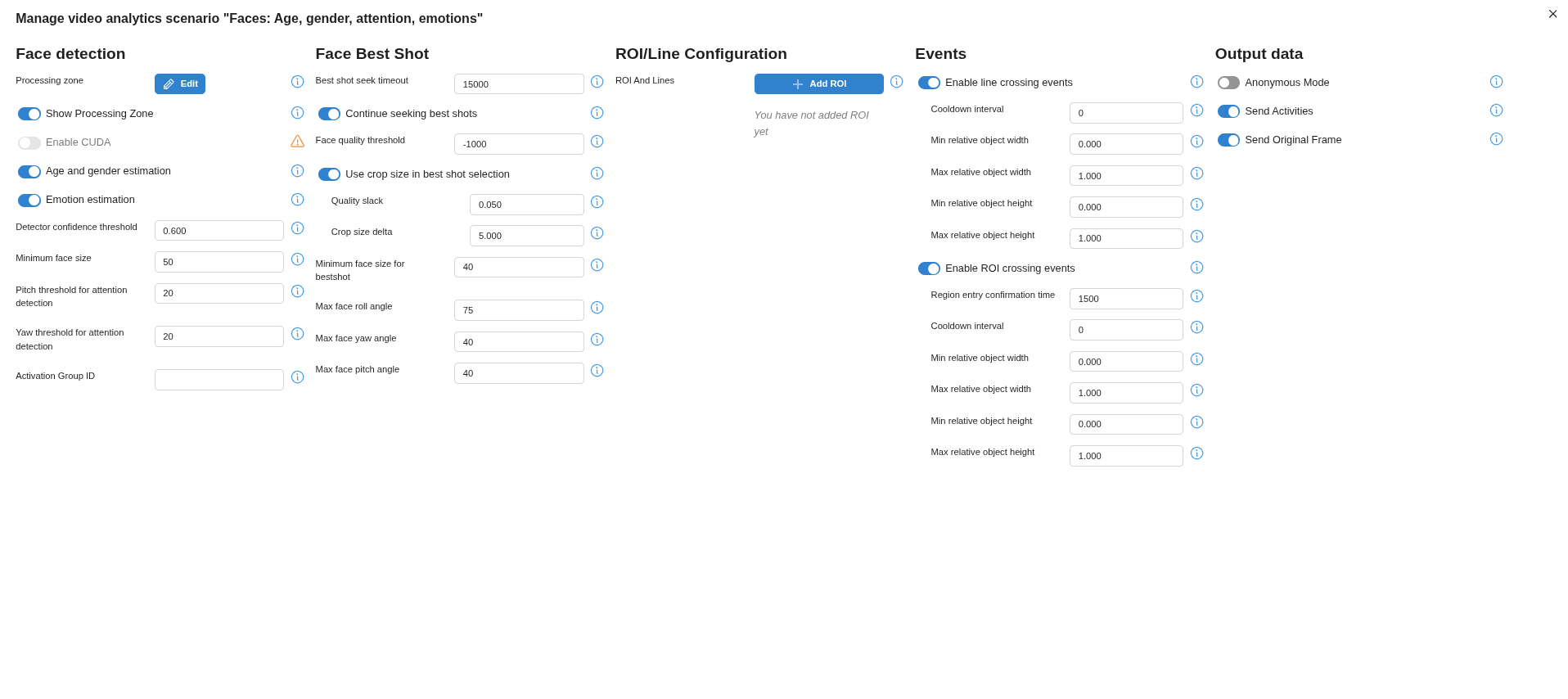
Face detection settings
| Setting | Description |
|---|---|
| Video Analytics Zone | Allows configuring the area of the frame to process the video stream. |
| Max FPS | Maximum FPS of the input video stream for the selected video analytics scenario. |
| Use CUDA for Detector | Toggle on to enable GPU acceleration for the face detector. |
| Gender and Age Detection | Toggle on to enable Agent to determine the gender and age of detected faces. |
| Emotion Detection | Toggle on to enable Agent to recognize basic emotions: joy, surprise, calm, anger, disgust, sadness, and fear. |
| Detector Confidence Threshold (score), % | Determines the probability of a face being present in the frame: 0–100%. Default is 0.6. Faces below this threshold are ignored. Important: Ensure that the score values in OMNI Agent and OMNI Platform match. Otherwise, some activities generated from the transmitted processes may not be linked to the correct profile. |
| Minimum Face Size (pixels) | Excludes very small objects. Faces smaller than this value are ignored. |
| Head Tilt Threshold for Attention | Limits the allowable vertical tilt of the head when analyzing attention. |
| Head Turn Threshold for Attention | Limits the allowable horizontal turn of the head when analyzing attention. |
| Activation Group ID | Used to start/stop video analytics scenarios via API. |
Best shot selection
| Setting | Description |
|---|---|
| Best Frame Search Timeout | Default: 15000 ms. The best frame and face biometric template are not updated within this time. |
| Continue Searching Best Frames | Enabled by default. Best frame search continues after the first best frame is found. |
| Face Quality Threshold | Default: -1000. Frames below this quality are excluded from best frame selection. |
| Consider Face Size for Best Frame | Enabled by default. Allows selecting a slightly lower-quality frame if the face is significantly larger. Quality Tolerance: Default 0.05 (5%). Set 0 to disable. Face Size Step: Default 5 px. Step size for checking larger faces as best frames. |
| Minimum Face Size for Best Frame | Default: 40 px. Faces smaller than this are excluded. |
| Rotation Angle Threshold | Default: 75°. Faces with head rotation exceeding this angle are excluded. |
| Horizontal Deviation Threshold | Default: 40°. Faces with horizontal deviation beyond this are excluded. |
| Vertical Deviation Threshold | Default: 40°. Faces with vertical deviation beyond this are excluded. |
Face recognition
| Setting | Description |
|---|---|
| Enable Recognition | Enabled by default. Activates biometric template creation and database search. |
| Enable CUDA | Increases performance using GPU acceleration. Requires Nvidia GPU and installed CUDA/cuDNN libraries. |
Face database
| Setting | Description |
|---|---|
| Enable CUDA | Increases performance using GPU acceleration. Requires Nvidia GPU and installed CUDA/cuDNN libraries. |
| Matching Threshold | Default: 0.876. Faces above this similarity threshold belong to the same person. |
| Number of Identification Candidates | Default: 3. Number of candidates in the identification event. A candidate is a profile from the database matching the detected face with high similarity. |
Events
| Event | Description / Default |
|---|---|
| Identification Events | Triggered when a detected face matches a database entry. Enabled by default. A repeat event skip interval can be set per face (default: 5000 ms). |
| Non-identification Events | Triggered when no match is found in the database. Enabled by default. |
| Face Hide Control Events | Triggered when face detection quality is insufficient for recognition. Enabled by default. Filtering by user groups is disabled by default, allowing event sending regardless of control list membership. If disabled, specific control lists can be applied for identification. |