Porting models to Sophon
Porting models to Sophon
Running neural network models on the 3DV-EdgeAI-32 device requires converting the source model to bmodel format, the native inference format for the TPU.
Compiling the ONNX model to bmodel format is performed using the specialized TPU-MLIR tool, which optimizes the computational graph for the TPU architecture and prepares the model for efficient execution on the target device.
Prerequisites
All steps must be performed on a device that meets the following requirements:
- x86-64 CPU
- Ubuntu 16.04+ OS
- 12 GB or more of RAM
Docker software must be installed and configured on the device.
Preparing the environment
Download the YOLOv5 archive with data and weights. Place the archive in the mounted working directory and unzip it.
tar xf data.tar.gzDownload the Docker image.
docker pull sophgo/tpuc_dev:v3.2Run the container.
docker run --privileged --name bmodel -v $PWD:/workspace -it sophgo/tpuc_dev:v3.2Install tpu-mlir in the container.
pip3 install tpu_mlir==1.7
Compiling the model
Convert the ONNX file to the intermediate mlir format.
mkdir -p export
cd export

model_transform\
--model_name yolov5m \
--model_def\
../models/onnx/yolov5m_v6.1_1output_1b.onnx \
--input_shapes [[1,3,640,640]] \
--mean 0.0,0.0,0.0\
--scale 0.0039216,0.0039216,0.0039216 \
--keep_aspect_ratio\
--pixel_format rgb\
--output_names output\
--test_input\
../datasets/test/dog.jpg \
--test_result yolov5m_top_outputs.npz \
--mlir yolov5m.mlir
Convert the mlir file to bmodel (example for FP16 precision).
model_deploy \
--mlir yolov5m.mlir \
--quantize F16 \
--processor bm1684x \
--test_input yolov5m_in_f32.npz \
--test_reference yolov5m_top_outputs.npz \
--tolerance 0.99,0.99 \
--model yolov5m_1684x_f16.bmodel
These commands will create the file export/yolov5m_1684x_f16.bmodel.
For more information, see the TPU-MLIR manual.
The input_shapes and output_names values for any ONNX file can be obtained using the Netron application.
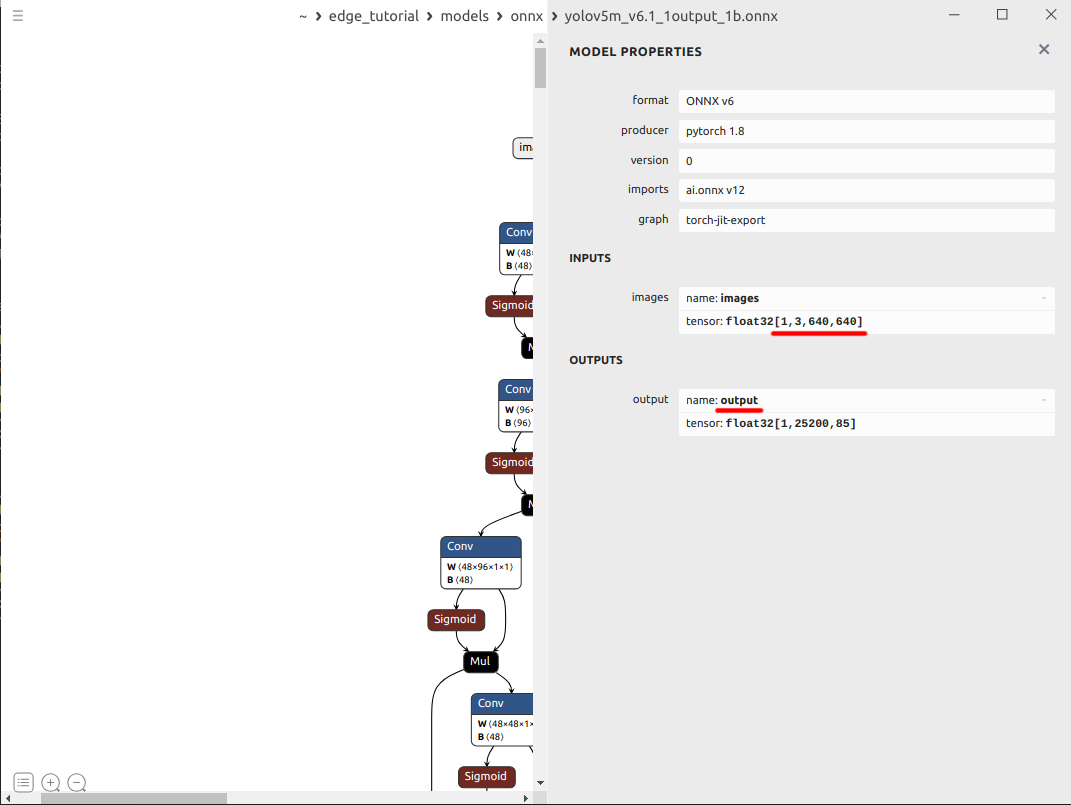
Running a model in Python: YOLOv5 example
Prerequisites
All steps are performed on a 3DV-EdgeAI-32 device.
Preparing the environment
Download the dependencies archive. The archive includes the minimum set of libraries required for inference on the device. Place the archive in the working directory on the device and unzip it.
tar xf deps.tarExtract the runtime libraries and set environment variables to search for the required libraries.
sophon_lib_path="/opt/sophon/libsophon-current/lib"
sophon_opencv_path="/opt/sophon/sophon-opencv-latest/opencv-python/"
export LD_LIBRARY_PATH="$LD_LIBRARY_PATH:$sophon_lib_path"
export PYTHONPATH="$PYTHONPATH:$sophon_opencv_path"
echo >> ~/.bashrc
echo "# set library search paths for sophon modules for python" >> ~/.bashrc
echo 'export LD_LIBRARY_PATH="$LD_LIBRARY_PATH:'$sophon_lib_path'"' >> ~/.bashrc
echo 'export PYTHONPATH="$PYTHONPATH:'$sophon_opencv_path'"' >> ~/.bashrc
Extract and install the
sophonpackage for Python.tar xf sophon-sail_3.7.0.tar.gz
pip3 install sophon-sail/python_wheels/soc/libsophon-0.4.9_sophonmw-0.7.0/py38/sophon_arm-3.7.0-py3-none-any.whlClone the
sophon-demorepository.git clone -b release https://github.com/sophgo/sophon-demo.gitIMPORTANTIf your model is not listed in the list of models for which there is already an example, you will need to write your own example similarly. For example, for resnet.
Navigate to the YOLOv5 inference example folder.
cd sophon-demo/sample/YOLOv5Download the YOLOv archive with data and weights. Place the archive in the YOLOv5 example folder on your device and unzip it.
tar xf data.tar.gznoteThe attached archive contains the minimum set of weight files needed to test the inference on the device. Alternatively, you can use the script from the sophon-demo repository to download the full set of weights and data.
chmod -R +x scripts/
./scripts/download.sh
Inference test in Python
To run inference on the test image set, run the following commands:
To test the model with FP32 precision
python3 python/yolov5_opencv.py --input datasets/test --bmodel models/BM1684X/yolov5s_v6.1_3output_fp32_1b.bmodel --dev_id 0 --conf_thresh 0.5 --nms_thresh 0.5 --use_cpu_optTo test the model with INT8 precision
python3 python/yolov5_opencv.py --input datasets/test --bmodel models/BM1684X/yolov5s_v6.1_3output_int8_1b.bmodel --dev_id 0 --conf_thresh 0.5 --nms_thresh 0.5 --use_cpu_opt
This command will create a results/images folder in the YOLOv5 example folder, containing images visualizing the detection results.
Extended information about the Python test example is collected in the README_EN.md file.
3DiVi specialists have extensive experience in porting neural network models to the Sophon TPU architecture. To accelerate deployment and reduce development costs, you can rely on our team for the complete model adaptation pipeline, including:
- Model Porting. For this, we will need ONNX files of your models. For verification, it is also advisable to provide a set of control examples or a test dataset with quality metrics calculated before conversion.
- Model Quantization and Calibration. For this, we will need your datasets (one for calibration and one for quality verification), as well as quality metrics calculated before conversion.
- Optimization and Speedup. To optimize models for fast execution on 3DV-EdgeAI-32, we may require a verbal description of the preprocessing/postprocessing algorithm or the source code.
If necessary, we can also retrain the model.
Submit a request and we will be sure to help.